BlueLeaf Banking
A modern mobile banking experience that helps users manage their finances with confidence and ease.

What is BlueLeaf?
BlueLeaf is a mobile banking application designed to simplify financial management for everyday users.
BlueLeaf combines essential banking features with powerful financial insights, helping users make smarter decisions with their money. The app provides a seamless experience for checking balances, transferring funds, paying bills, and tracking spending patterns.
With a focus on clarity and simplicity, BlueLeaf transforms complex financial data into actionable insights that help users build better financial habits. The app's intuitive interface makes it easy for anyone to take control of their finances, regardless of their financial literacy level.
Bank-Level Security
Advanced encryption and authentication
Card Management
Control all your cards in one place
Spending Analytics
Visualize and understand your finances
Smart Notifications
Stay informed about your money
Project Details
UX/UI Designer
3 weeks (2025)
Personal Project
Figma, Illustrator
Problem
It can be difficult and time-consuming to manage personal finances; many people find it difficult to maintain track of numerous accounts, create budgets, and recognize their spending patterns. Conventional banking apps frequently lack the intuitive tools and information required to simplify and relieve the burden of managing finances.
Solution
BlueLeaf makes financial management easier with its user-friendly interface, cutting-edge security, and tailored insights. Users can easily manage their finances, set goals, and make well-informed decisions with BlueLeaf's comprehensive budgeting tools and one-stop account connectivity.
Design Process
My design process for BlueLeaf focused on creating a banking experience that feels approachable, trustworthy, and empowering. I aimed to balance the technical requirements of a secure financial application with the need for an intuitive, stress-free user experience.
Competitive Analysis
I analyzed leading mobile banking apps to understand market expectations and identify opportunities for differentiation.
Chime
Digital Banking Platform
+ No hidden fees messaging
+ Clean, simple interface
- Limited budgeting tools
- Basic spending insights
Mint
Personal Finance App
+ Comprehensive budgeting
+ Multi-account aggregation
- Cluttered interface
- Ads disrupt experience
Revolut
Digital Banking Super App
+ Beautiful data visualization
+ Feature-rich platform
- Overwhelming for new users
- Complex navigation
Key Opportunity Identified
There is an opportunity to create a banking app that combines Revolut's beautiful data visualization with Chime's simplicity, while adding actionable spending insights that help users build better financial habits.
User Personas
Based on research, I developed two primary personas to guide design decisions for BlueLeaf.
Emily Chen
Young Professional, 28
Track spending across multiple categories, save for future goals, understand where money goes each month
Traditional bank apps are confusing, can't easily see spending patterns, transfers take too many steps
"I want to see exactly where my money is going without having to do mental math."
David Rodriguez
Family Man, 35
Manage household budget, quickly transfer money to family members, keep track of recurring bills
Juggling multiple accounts is tedious, notifications are too generic, hard to plan ahead
"I need a banking app that helps me stay on top of bills without constant worry."
Research
References
I gathered inspiration from leading fintech apps and banking solutions to understand current best practices.
Problem and solution
I identified key pain points in traditional banking apps and developed targeted solutions to address them.
Competitive Analysis
I analyzed 8 competing banking apps to identify strengths, weaknesses, and opportunities for differentiation.
Define
Brainstorming
I conducted ideation sessions to explore innovative approaches to financial management and visualization.
User Flows
I mapped out key user journeys to ensure intuitive navigation and minimal friction for common banking tasks.
Final Design
Wireframes
I created low-fidelity wireframes to establish information hierarchy and core functionality.
UI Kit
I developed a comprehensive UI component library to ensure consistency across the entire application.
Prototyping
I built interactive prototypes to test user flows and gather feedback before final implementation.
Design
I finalized high-fidelity designs with a focus on clarity, accessibility, and visual appeal.
User Journey Map
Mapping the user journey helped identify key touchpoints and emotional states when managing finances with BlueLeaf.
Actions
Downloads app, creates account, links bank
Actions
Transfers funds, sets up direct deposit
Actions
Checks balance, makes transfers, pays bills
Actions
Reviews spending, sets budgets, tracks goals
Actions
Opens savings, invests, refers friends
Feeling
Cautious, hopeful
Feeling
Nervous, committed
Feeling
Comfortable, in control
Feeling
Enlightened, motivated
Feeling
Confident, empowered
Opportunity
Secure, simple setup flow
Opportunity
Clear confirmation and trust signals
Opportunity
Quick actions, minimal friction
Opportunity
Actionable financial insights
Opportunity
Celebrate financial milestones
Low Fidelity Wireframes
Before committing to high-fidelity designs, I sketched several genuinely different directions for the two most important screens — the Dashboard and the spending Data view — then chose based on how well each served both personas.
Dashboard — Three Directions Explored
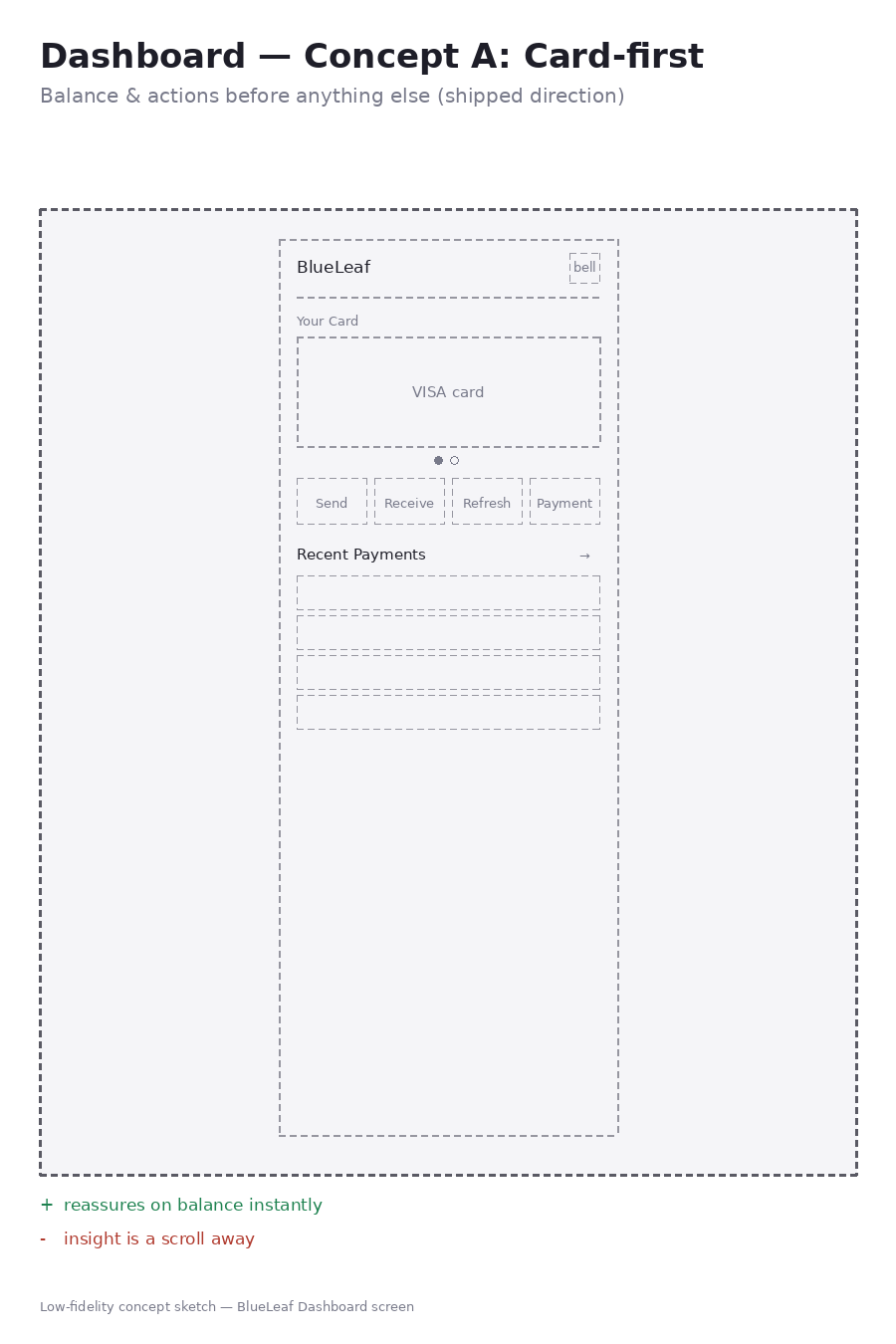
Concept A — Card-First (shipped)
+ Reassures on balance instantly
− Insight is a scroll away
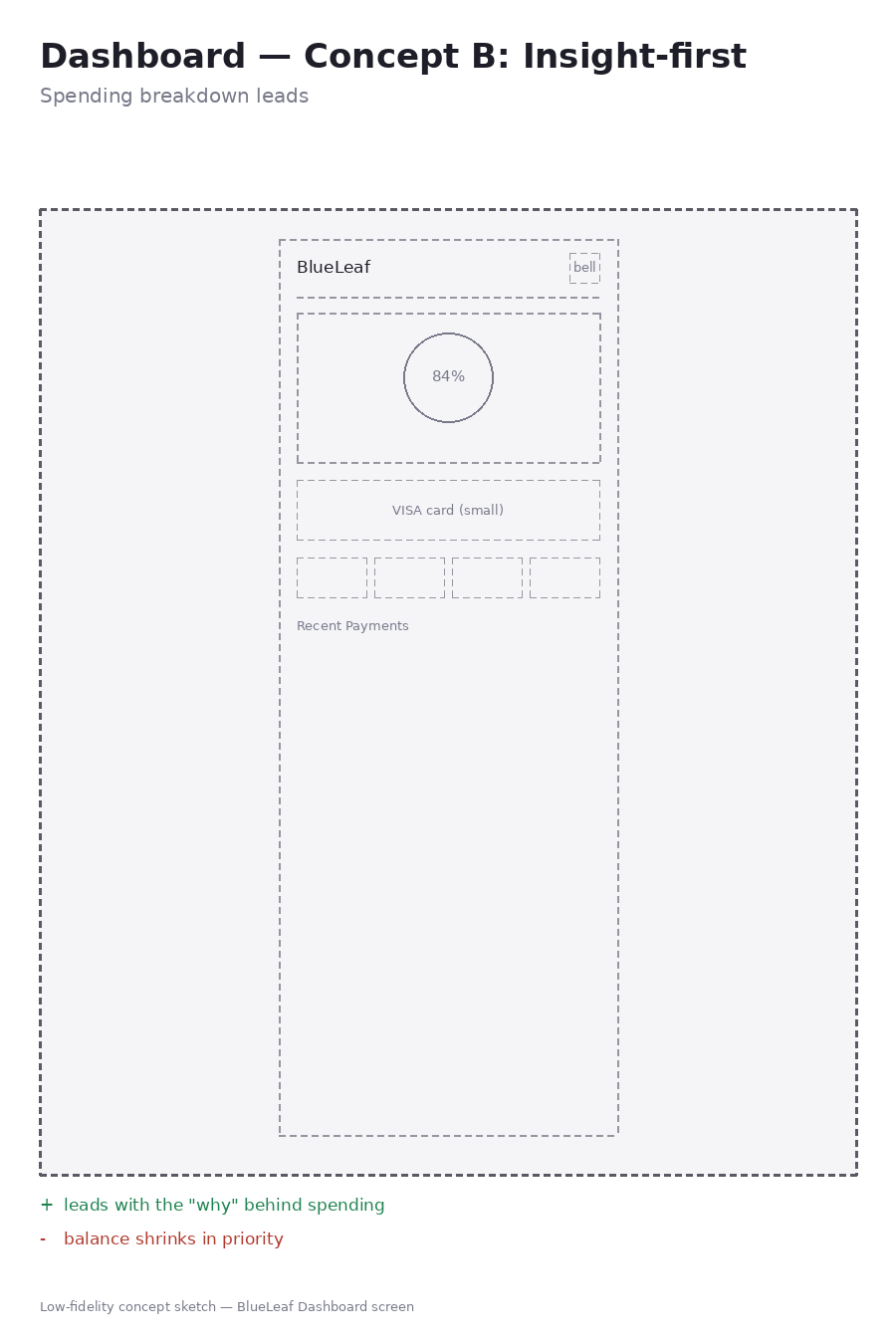
Concept B — Insight-First
+ Leads with the “why” behind spending
− Balance shrinks in priority
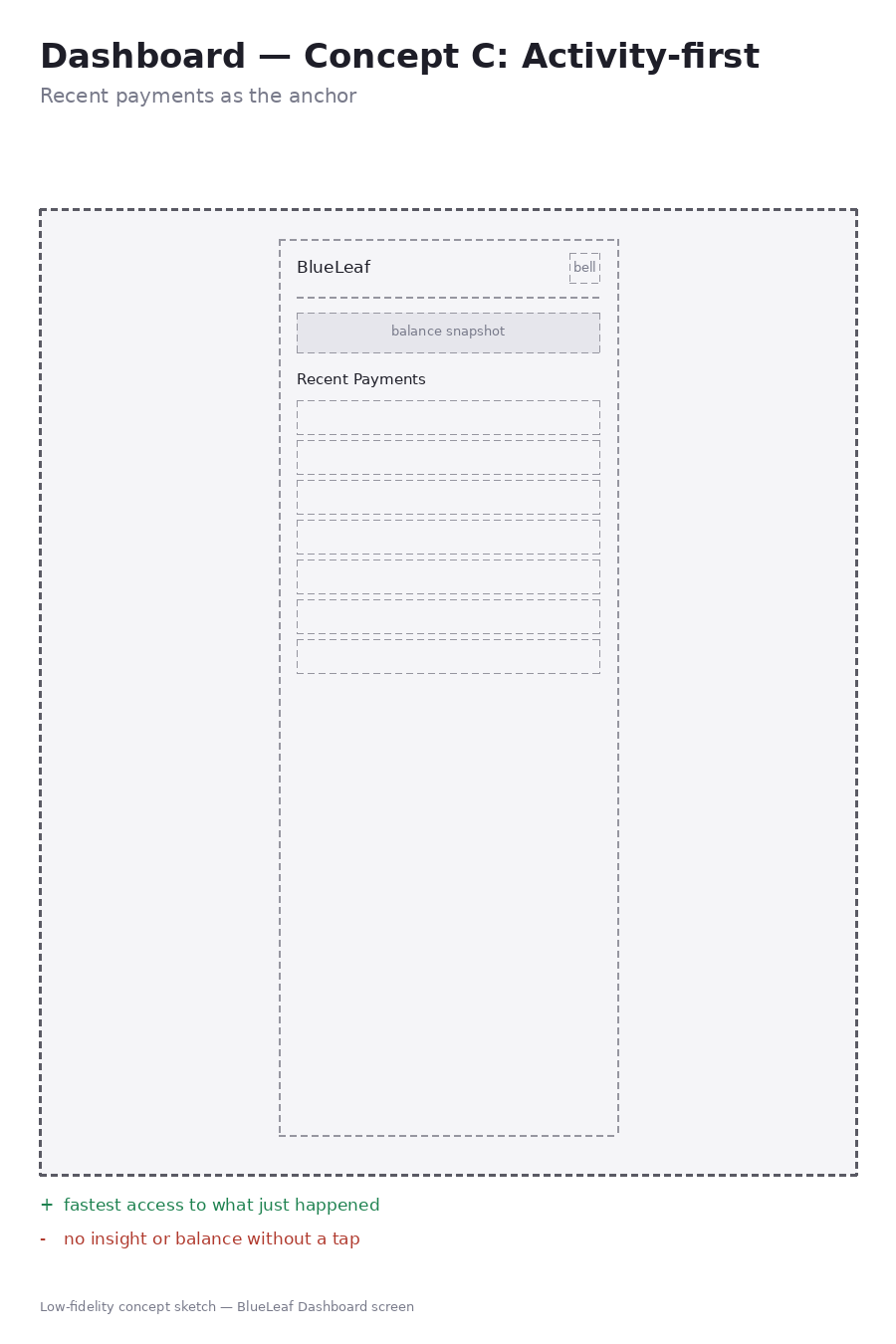
Concept C — Activity-First
+ Fastest access to what just happened
− No insight or balance without a tap
Why Card-First Won
I considered leading with spending insight or activity instead, but chose to keep balance and quick actions up top — Emily and David both needed fast reassurance about their account before anything else, and burying that below a chart risked undercutting the “financial clarity” goal.
Data — Three Directions Explored
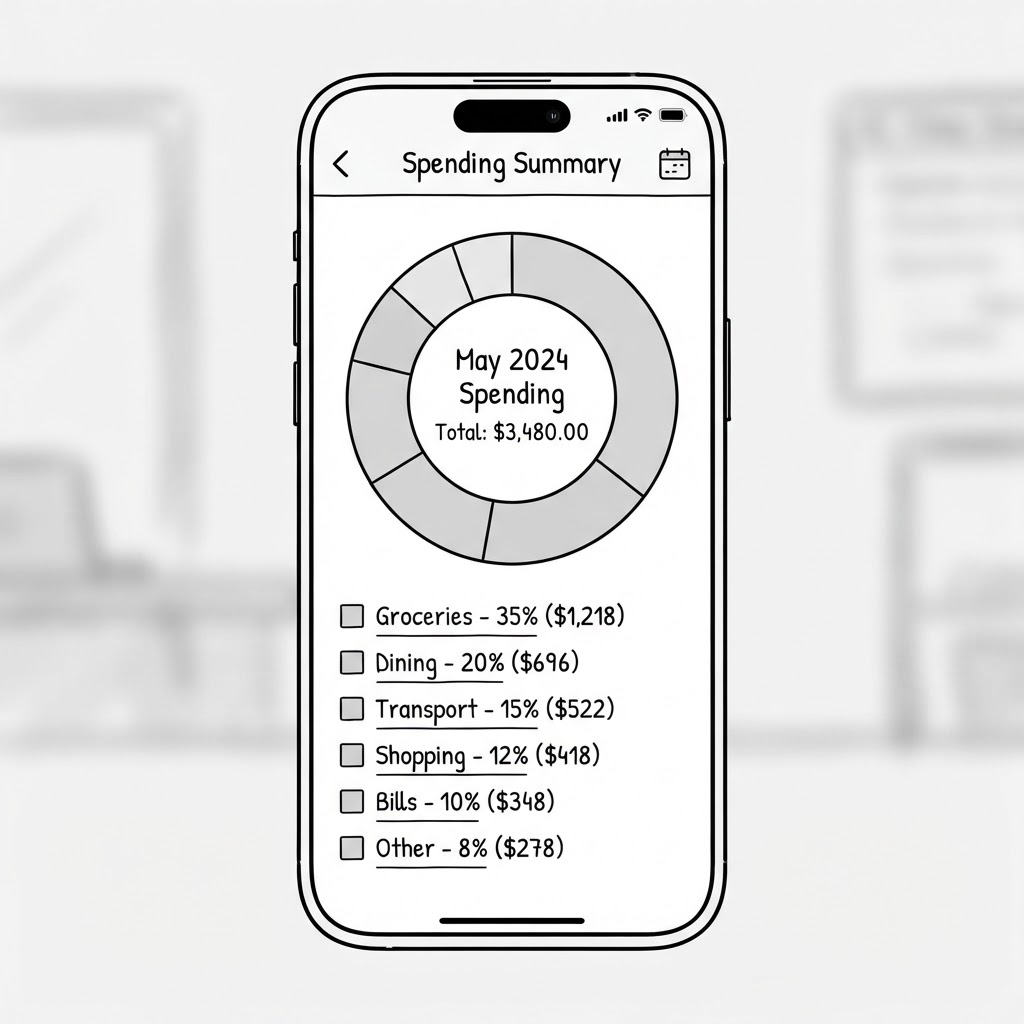
Concept A — Donut Chart (shipped)
+ Proportion-at-a-glance: “where did my money go?”
− Weaker at showing change over time
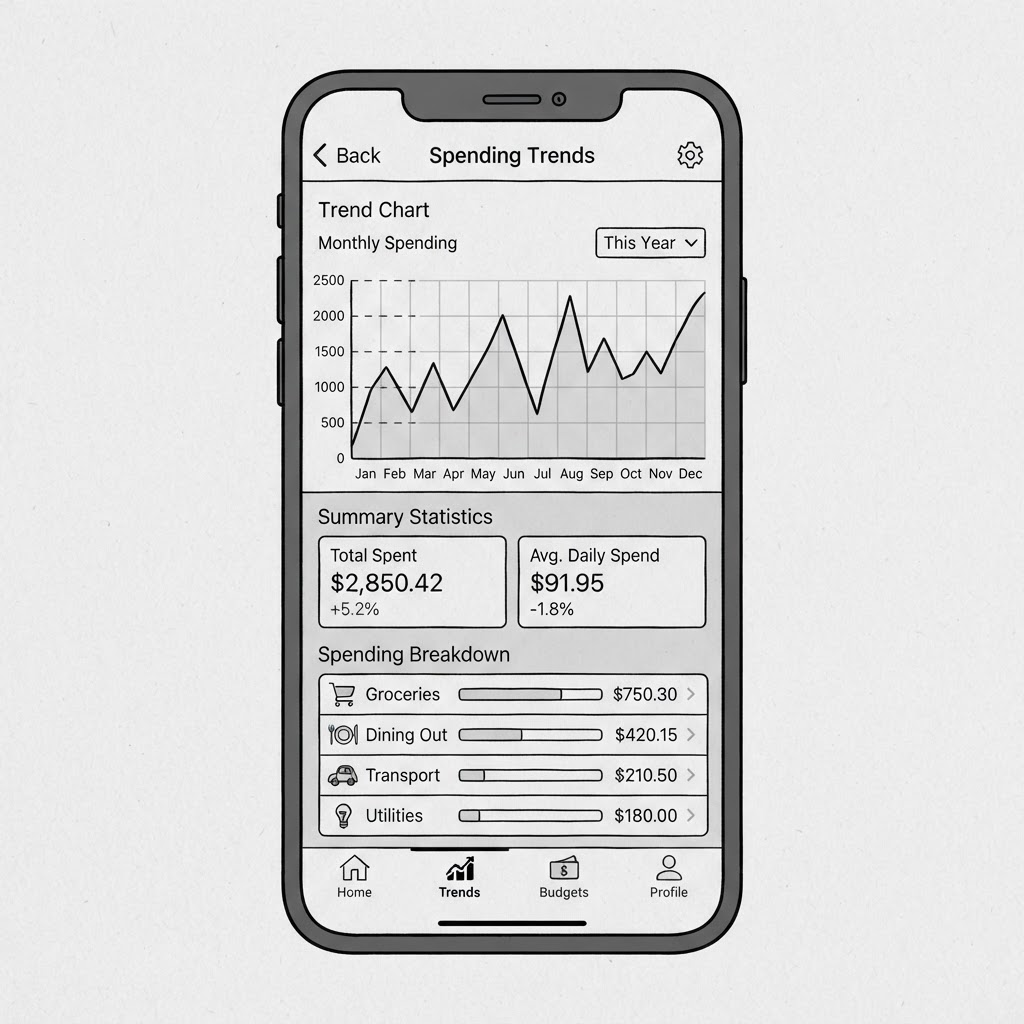
Concept B — Trend Chart
+ Shows spending patterns over time
− Loses the single-month proportion read
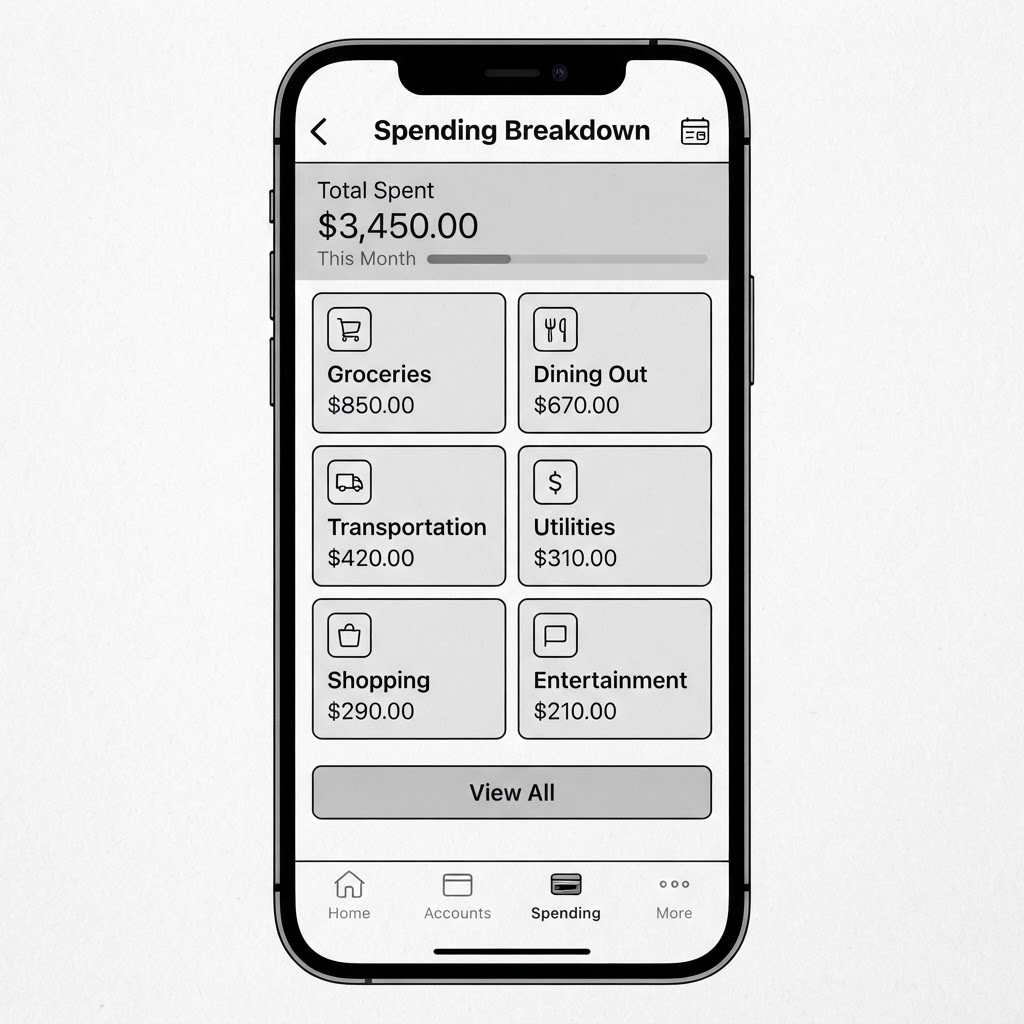
Concept C — Category Cards
+ Fastest to scan exact amounts per category
− No visual sense of proportion between categories
Why the Donut Won
A trend chart would show spending patterns over time, and category cards would be faster to scan — but the donut kept the proportion-at-a-glance read that matches how people actually think about “where did my money go this month,” which is the more common Data-screen use case.
Defending the Choice
Card-first wasn't the most visually distinctive direction, but it was the only one that served both personas without a trade-off — Emily's need for insight and David's need for fast transfers both start from the same anchor point: balance and quick actions.
The Transfer and Add Card flows were carried forward as single directions — no divergent set was explored for those screens.
Design Principles
Trust & Security
Design choices that reinforce security and build confidence
Financial Clarity
Presenting complex financial information simply
Empowerment
Enabling users to feel confident with their finances
Accessibility
Inclusive design for users of all abilities
User Flows
I designed intuitive user flows to ensure that banking tasks could be completed with minimal friction. The focus was on creating experiences that feel secure while remaining simple and straightforward.
Key Considerations
- Minimize steps for common tasks
- Provide clear confirmation at each step
- Balance security with convenience
- Ensure clear error handling
Account Overview & Transaction Flow
This flow allows users to quickly access their account information and transaction history. The design prioritizes clarity and speed, with minimal steps between login and viewing account details.
Money Transfer Flow
The money transfer flow is designed to be secure yet straightforward. Each step provides clear confirmation, and the review stage ensures users can verify all details before finalizing the transaction.
Typography & Colors
Typography
Montserrat
Primary FontThe quick brown fox jumps over the lazy dog
The quick brown fox jumps over the lazy dog
The quick brown fox jumps over the lazy dog. This font is used for body text and longer paragraphs to ensure readability.
Color Palette
Accessibility Considerations
All color combinations in the BlueLeaf app meet WCAG 2.1 AA standards for contrast ratio. The light blue (#2C6BF2) and white text combination has a contrast ratio of 4.5:1, meeting the minimum requirement.
UI Design Results
The final UI design for BlueLeaf balances professionalism with approachability. I created an interface that feels trustworthy and secure while making complex financial information easy to understand and act upon.

Data visualization and card management screens showcasing the app's financial insights capabilities
Secure Authentication
Multi-factor authentication with biometric options provides security without sacrificing convenience. Visual cues reinforce security at every step.
Intuitive Analytics
Financial data is visualized in easy-to-understand charts and graphs. Spending patterns are automatically categorized and presented with actionable insights.
Simplified Transfers
Money transfers are streamlined with saved recipients and quick-access features. Clear confirmation steps ensure users feel confident about their transactions.
Key Screens
The dashboard provides a comprehensive overview of the user's financial situation at a glance. Account balances are prominently displayed at the top, with recent transactions and spending insights below. The clean layout ensures users can quickly find the information they need without feeling overwhelmed.
The account details screen offers a deeper dive into a specific account. Transactions are organized chronologically with clear categorization and search functionality. Users can easily filter by date, amount, or category to find specific transactions.
The transfer flow is designed to be both secure and efficient. Users can quickly select recipients from their contact list or enter new details. The amount entry screen features a custom numeric keypad optimized for financial transactions, and the review screen clearly presents all details before confirmation.
Project Outcome
BlueLeaf was where I learned how much visual hierarchy carries the weight of a finance product — when the numbers are clear, the whole app feels trustworthy. The biggest thing I took away was designing around two distinct personas at once; balancing Emily's need for spending insights against David's need for fast, repeatable transfers forced me to prioritise ruthlessly rather than designing one bloated dashboard. If I iterated again, I'd validate the spending-insights visualisations with a real usability test to confirm people actually read the charts the way I intended, and I'd pressure-test the transfer flow for error states and edge cases I glossed over. More than a finished screen set, this project demonstrated my process: research-led decisions, clear trade-offs, and a willingness to cut features that don't serve the user.
I didn't run usability testing on this project — that's the next thing I'd add before calling it complete.
Back to Projects